EZCalculate Widget1.0
Publisher Description
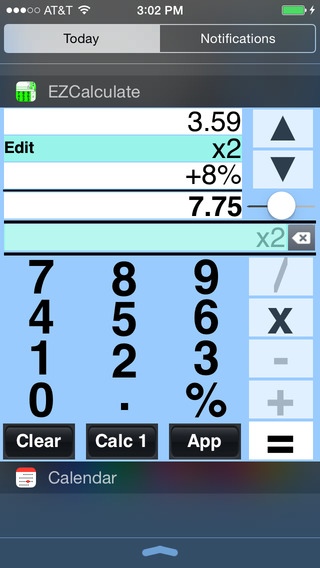
As an iOS 8 widget, EZCalculate turns your iPhone into an always available calculator. It is easy to use because it lets you view and change any of your entries. You can even customize the color!
WIDGET
As a widget (iOS 8 or later), you can instantly get to your calculator without having to unlock your phone or locate the app.
SAVES YOU TIME
This calculator will save you time with 100% accuracy. Ever try entering a long list of numbers and each time you get a different answer? Like when balancing your checkbook or doing an expense report? Then, you need EZCalculate. All you need to do is scroll through your entries (using the scroll arrows), review them, correct any mistakes, and the new total is recalculated automatically.
EASY TO USE
It has a large custom keyboard for a quick and easy touch and an enhanced % key for calculating percent discounts, tips, and sales tax.
THREE BEAUTIFUL CALCULATORS
Amazing! This is not just one calculator. It is actually three independent calculators. You can assign any of the 10 standard colors to each calculator using the app s color bar.
YOU CAN DESIGN YOUR OWN COLORS
FEEL PINK? Then, make your calculator pink! It s that simple. Using the app, you can design your own custom colors to personalize any of the three calculators.
DECIMAL SLIDER
Check out the decimal slider! At any time, you can choose how many digits after the decimal point (0 4) you want to see in the total.
WIDGET FEATURES
Three (3) independent calculators
Custom color for each calculator
View all entries using scroll arrows
Correct any entry
Copy and paste totals
Auto save to continue later
Custom keyboard for an easy touch
Keyboard clicks for audible confirm
Decimal point slider (0-4 places)
Plus % is great for tax & tips
Minus % is great for discounts
App key in widget to launch App
APP INCLUDES ALL FEATURES OF WIDGET PLUS
Email results to yourself or anyone
Mute sounds
Create Customize colors for calculators
Requires iOS 7.1 or later. Compatible with iPhone, iPad, and iPod touch.
About EZCalculate Widget
The company that develops EZCalculate Widget is Robert Wohnoutka. The latest version released by its developer is 1.0.
To install EZCalculate Widget on your iOS device, just click the green Continue To App button above to start the installation process. The app is listed on our website since 2014-10-08 and was downloaded 6 times. We have already checked if the download link is safe, however for your own protection we recommend that you scan the downloaded app with your antivirus. Your antivirus may detect the EZCalculate Widget as malware if the download link is broken.
How to install EZCalculate Widget on your iOS device:
- Click on the Continue To App button on our website. This will redirect you to the App Store.
- Once the EZCalculate Widget is shown in the iTunes listing of your iOS device, you can start its download and installation. Tap on the GET button to the right of the app to start downloading it.
- If you are not logged-in the iOS appstore app, you'll be prompted for your your Apple ID and/or password.
- After EZCalculate Widget is downloaded, you'll see an INSTALL button to the right. Tap on it to start the actual installation of the iOS app.
- Once installation is finished you can tap on the OPEN button to start it. Its icon will also be added to your device home screen.
